ArcLauncher
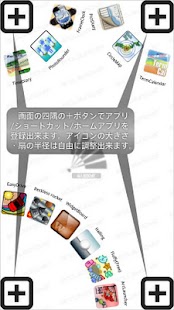
[Registration of the application to start]A push on the "Add" button in four corners will display an application selection dialog.
The selected application is added as application which starts by the fan of the position.
Two or more applications can be registered into each fan.
You can register shortcut by choosing "Create shortcut".You can register home application choosing "Select home".(You can use as home changer)
Arc size can also be changed by dragging an "Add" button.
(A function can also be turned OFF by Preference)
Change of application can be performed if the tap of the fan is carried out in the state where application is registered.
(Registration can also be canceled by choosing "Remove".)
A position is exchangeable if it slides in the state where application is registered, and it is in the same arc.
When you enlarge arc size and you are hard to register the size of a fan, please choose menu "Edit area" and choose the area to show in edit view.
Since only the area for edit is displayed on an edit view, it becomes easy to operate it.
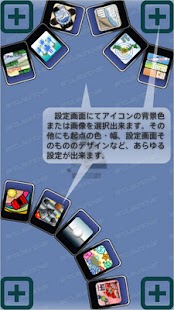
[Preference]* Show or hide each corner.* Position and width and height of starting area, and show or hide.* Set starting area to short side.* Distance to active launcher.* Use vibration.* Animation speed of Launcher.* Style of Launcher.* Show or hide application name, color and size.* Size and rotate of icon.* Background color of arc.* Color and height of selected area.* Show on going area and icon.* Color of main view and add button.
[Export and Import data]Preference data can be saved on SD card by "Export data" of Menu.
The saved Preference data can be read by "Import data" of Menu.
Please use for taking over a setup to the PAY version from the free version, or backing up a setup.
[Launcher style]* CardAlpha of background color is ignored."Inside application name" is applied also at the time "Rotate icon" is off.
* Image fileImage to use is performed from "Select image" of the menu of main view.Image is drawn in a size as it is, and Icon is displayed on the center of the Image.In the case of selected, Image is expanded according to the size ratio of Icon.
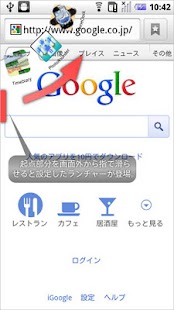
[Using of launcher]After ending an application, a launcher will be in a standby state.A sector launcher is displayed by sliding the screen near the starting point slowly inside from the outside of a screen.
The application can be started by carrying out the tap of the position of an icon.
Launcher can be closed by carrying out the tap of the outside of the range of arc.
[Permissions]* "Services that cost you money"Since an applicable activity will become "Not found" by shortcut of "Direct dial" starting if this permission does not exist, it has added.
This application does not send a telephone.
With pay version, since this authority is not given, shortcut of "Direct dial" does not function directly.
[Special item]This is a function of only the pay version.
You can create shortcut of* Change starting point (Whenever it performs, starting point position can be changed in long side and short side)* System setting* Sound setting* Wireless setting* Application setting* Expand statusbar* Invalidate staring point
[Pay version]The advertisement is not displayed.You can create Special item.You can start by swiping.Permission "Services that cost you money" is removed.
- It operates since Android1.6.
- It is a confirmed operation by N-04C, SH-12C.
About ArcLauncher
- Package name (App ID)
- com.psc.fukumoto.ArcLauncherPay
- Available on
- Google Play
- Price
- Free
- Version
- v1.4.5
- Developer
- Steadfast Innovation, LLC
Looking for the ArcLauncher APK?
The safest way to get ArcLauncher (com.psc.fukumoto.ArcLauncherPay) on your Android device is to install it directly from Google Play — you'll always get the latest official version, automatic updates, and no risk of modified or infected APK files from third-party sites.
Music Features
Enjoy high-quality music streaming and playback features.
Gaming Features
Enjoy immersive gaming experience with various game modes.
Financial Tools
Manage your finances and track your expenses easily.
See ArcLauncher in Action
Frequently Asked Questions
Is ArcLauncher free?
Yes, ArcLauncher is free to download and install on Android through Google Play.
How do I install ArcLauncher on Android?
Open Google Play on your Android phone or tablet, search for ArcLauncher by Steadfast Innovation, LLC or tap the Google Play button on this page, then tap Install. The app downloads and installs automatically.
What is com.psc.fukumoto.ArcLauncherPay?
com.psc.fukumoto.ArcLauncherPay is the App ID (package name) of ArcLauncher on Google Play. Every Android app has a unique package name, and it is the safest way to verify you are installing the official app.
Is ArcLauncher safe to download?
Installing ArcLauncher from Google Play is the safest option: you get the official version published by Steadfast Innovation, LLC, verified by Google Play Protect, with automatic updates. Avoid APK files from unofficial third-party sites.
Get ArcLauncher Today
ArcLauncher for Android — free download on Google Play.
Compatible with Android phones and tablets — available on Google Play.
Ask AI about this app
Get instant answers about features, tips and more from popular AI assistants.